
Keep the setup fee on its own line and add repeat settings only to the ongoing service.
1. Enter separate lines
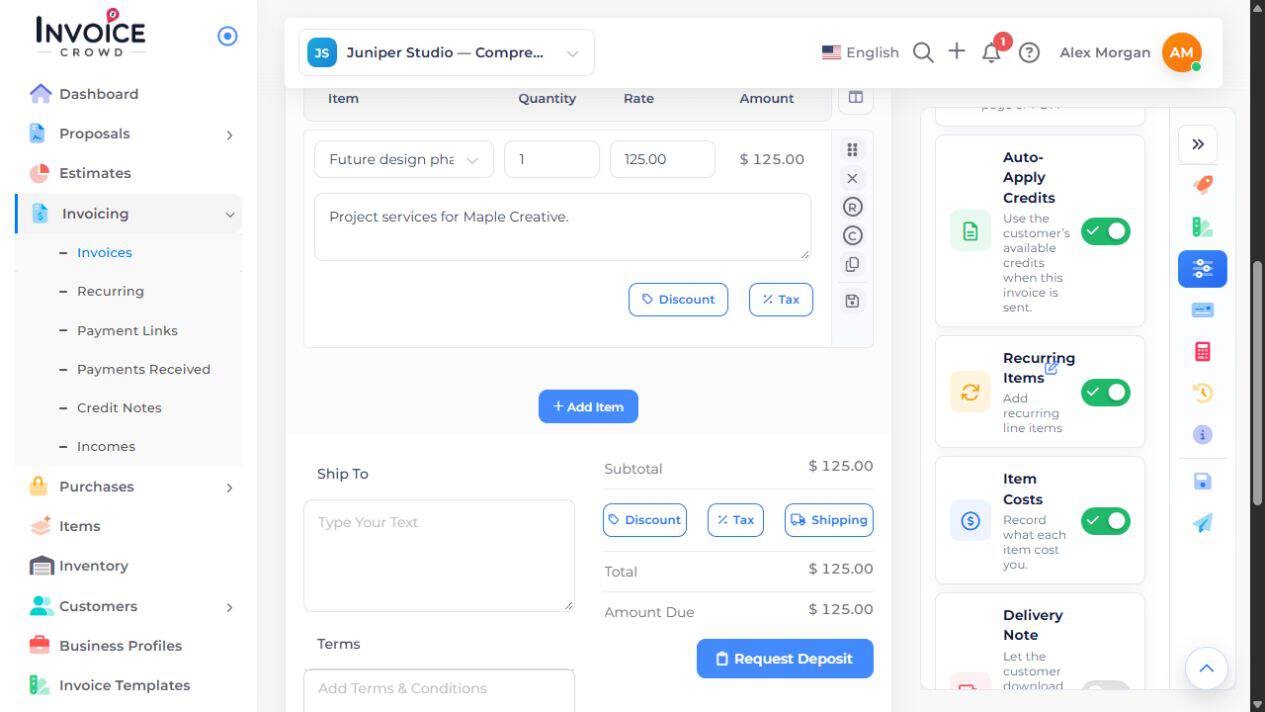
Open or create the customer invoice under Invoicing → Invoices. Add one line for the setup fee and another for the ongoing service. Check quantities, prices and tax.
2. Enable Recurring Items
Open Options and turn on Recurring Items. On the service line, choose the R control labeled Recurring Items. Leave the setup-fee line without repeat settings.
3. Set the service schedule
In the recurring popup, choose Issue Date, How Often, the timing shown for that frequency, and the invoice limit. Read the start notice: the repeating line starts after this invoice is fully paid and no earlier than its selected date.
4. Choose how it is charged
Under Charge Type, choose Manual or Automatic. For Manual, choose Send Invoice Automatically or Create Drafts to Send Manually under Delivery Options. Review Status → Automatically Mark as Paid separately: when enabled, each invoice is recorded as paid and is not emailed; no money is collected. Automatic requires a connected subscription gateway and the customer’s approval; it is unavailable while split or partial payments are enabled.
5. Submit and verify
Choose Submit to apply the line’s settings, then save the invoice. Reopen the service’s R control to check its schedule and preview the invoice. The setup fee should have no repeat settings.